
Download XspaceGPT – AI‑Powered X (Twitter) Space Transcriber & Summarizer
Overview: Transform X Space Chats into Searchable, Insightful Text
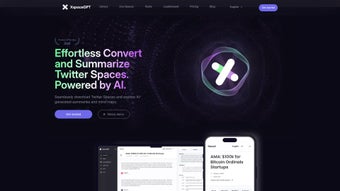
XspaceGPT is a web‑based AI application built specifically for the fast‑moving world of X (formerly Twitter) Spaces. It does more than simply turn audio into text – it intelligently extracts the core ideas, creates concise summaries, and organizes the content into searchable, speaker‑specific outlines. Whether you’re a content creator looking to archive live discussions, a marketer hunting for key insights, or a researcher needing reliable transcripts, XspaceGPT offers a secure, fast, and user‑friendly solution.
The platform supports multiple languages, so global audiences can benefit from accurate transcription and translation without needing separate tools. With AI‑generated highlights and a visual timeline, users can quickly jump to the most relevant moments, saving countless hours that would otherwise be spent listening to long recordings. A free tier gives unlimited basic transcriptions, while premium subscribers unlock advanced features such as mind‑map visualizations, a personal content library, and deeper analytics.
The service runs entirely in the browser, meaning there’s no need to install heavyweight software; you simply log in, paste the Space URL, and let the AI work its magic. By combining cutting‑edge natural language processing with a clean UI, XspaceGPT makes it effortless to capture, review, and repurpose X Space conversations for any purpose.
Key Features & Benefits
XspaceGPT’s feature set is designed around the real‑world needs of X Space participants. The AI engine not only transcribes speech with high accuracy but also condenses hours of dialogue into bite‑size summaries that retain the original meaning. Multilingual support means that non‑English speakers receive both transcription and translation, expanding the tool’s reach across continents.
AI highlights automatically detect the most impactful statements, while an interactive timeline lets you navigate directly to highlighted moments. For power users, the premium mind‑map feature visualizes the conversation’s structure, showing how topics branch and interrelate. A personal content library stores past transcriptions, enabling quick retrieval and comparison across multiple Spaces.
The platform also offers speaker‑specific summaries, which attribute key points to each participant, perfect for interview reviews or panel discussions. All these capabilities are delivered through a secure, cloud‑based environment that respects privacy and complies with data‑protection standards. Whether you need a quick recap for a social media post or a detailed transcript for legal documentation, XspaceGPT scales to meet the demand.
- Accurate AI‑driven audio‑to‑text conversion
- Automatic concise summaries and speaker‑specific outlines
- Multilingual transcription and translation
- AI‑generated highlights and interactive timeline
- Premium mind‑map visualization of discussion flow
- Personal content library for archived Spaces
- Free tier with unlimited basic transcriptions
- Secure, browser‑based operation – no local installation required
Installation, Usage & Compatibility
Getting started with XspaceGPT is intentionally simple. Because it’s a web application, there’s no traditional “installation” process – you just need a modern browser (Chrome, Edge, Firefox, or Safari) and an internet connection. Follow these steps to begin:
- Visit the official XspaceGPT website (https://xspacegpt.example.com).
- Create a free account using an email address or sign in with your X (Twitter) credentials.
- Once logged in, locate the “New Transcription” button on the dashboard.
- Paste the URL of the X Space you want to process. The system will fetch the audio stream automatically.
- Select your preferred language for transcription and any optional premium features (mind‑map, content library, etc.).
- Click “Start” and let the AI work. Transcriptions usually appear within a few minutes, depending on audio length.
- Review the generated transcript, summary, highlights, and timeline. You can edit the text, export it as a PDF/Word file, or save it to your personal library.
The tool runs on all major operating systems because it is browser‑based. For completeness, the supported environments are listed below:
Supported Platforms: Windows 10 or later, macOS 10.14+, Linux distributions with a modern browser, Android 8.0+ (Chrome), iOS 13+ (Safari). The responsive design ensures a seamless experience on both desktop and mobile devices.
Security is a priority. All data transfers are encrypted via HTTPS, and the platform complies with GDPR and CCPA guidelines. Premium users benefit from end‑to‑end encryption for stored transcripts, ensuring that sensitive conversations remain private.
Pros, Cons, Frequently Asked Questions & Final Verdict
Pros
- Highly accurate AI transcription with speaker differentiation.
- Automatic summarization saves time and improves content discoverability.
- Multilingual support expands usability across global audiences.
- Free tier provides generous functionality for casual users.
- No software download required – works directly in the browser.
- Premium mind‑map and content library add valuable organization tools.
- Secure, GDPR‑compliant handling of user data.
Cons
- Premium features require a subscription, which may be pricey for occasional users.
- Transcription speed depends on server load; peak times can cause slight delays.
- Audio quality of the original Space influences transcription accuracy.
- Limited offline capability – requires an internet connection at all times.
Frequently Asked Questions
Is XspaceGPT really free to use?
Yes, XspaceGPT offers a free tier that includes unlimited basic transcriptions and summaries. Premium features like mind‑maps and a personal content library are available through a paid subscription.
How accurate are the transcriptions?
The AI model behind XspaceGPT achieves over 95% accuracy on clear audio. Background noise or overlapping speech may slightly affect results, but the platform provides an easy editing interface to correct any errors.
Can I export the transcript to other formats?
Absolutely. Transcripts can be downloaded as plain text, PDF, or Microsoft Word files. Premium users also have the option to export mind‑maps as PNG or SVG images.
Does XspaceGPT store my data?
All uploaded audio and generated transcripts are stored securely on encrypted servers. Premium accounts receive end‑to‑end encryption for saved content, and users can delete any transcript at any time.
Is there a mobile app for XspaceGPT?
Currently XspaceGPT is a responsive web app, which works flawlessly on Android and iOS browsers. A dedicated mobile app is planned for future releases.
Conclusion & Call to Action
In a landscape where real‑time audio conversations are becoming a primary source of information, XspaceGPT stands out as the most comprehensive tool for turning those fleeting moments into permanent, searchable knowledge. Its blend of accurate transcription, AI‑driven summarization, multilingual support, and intuitive UI makes it a must‑have for anyone who participates in or monitors X Spaces. The free tier is generous enough for casual users, while the premium upgrade unlocks powerful organization features that can streamline workflows for professionals. If you regularly attend or host X Spaces and want to ensure no insight slips through the cracks, download XspaceGPT today and experience the future of audio‑to‑text conversion.
Overall Rating: 4.5 / 5
XspaceGPT delivers a robust set of AI features that dramatically reduce the effort required to archive and analyze X Space conversations. The free tier is functional, and the premium add‑ons provide real value for power users. Minor drawbacks such as reliance on internet connectivity are outweighed by the convenience of a cloud‑based solution. Highly recommended for creators, analysts, and anyone looking to capture the pulse of live audio discussions.



.png)



